
Sprites LogoSprites.ai
CustomersPricing
Sign in
Get a demo
Start 7-day trial→→
Get a demo
Sprites LogoSprites.ai
  • Run adsMeta AdsFacebook and Instagram, scaledGoogle AdsSearch, PMax and ShoppingLinkedIn AdsB2B targeting and ABMTikTok AdsShort-form video that convertsReddit AdsReach communities by intentGoal OptimizationHit your ROAS or CPL target
    Create & researchAd GeneratorOn-brand ads for any channelCreative AnalyticsThe hooks and angles that winCompetitor IntelligenceRivals' ads, SEO and AI reachMarket ResearchAudience insight, with sources
    SEO & AI visibilityAI SEO ContentArticles written and publishedAI VisibilityGet cited in AI answersSEO Site AuditPrioritized fixes, site-wideKeyword & Traffic ResearchWhere the searches and gaps are
    Meet SpritesYour AI ads team, on every channelResearches, builds and launches campaigns, then optimizes them daily. You approve every change.Scale the winner +$600/dayApprovePaused 14 wasted keywords+ SEO & AI searchStart 7-day trial
  • By teamStartups & SMBsSenior marketing, no headcountMarketing teamsMore campaigns, same teamAgenciesEvery client, one workspaceEnterpriseApprovals, governance, scale
    By businessB2B & ABMPipeline from target accountsEcommerce & D2CProfitable ROAS at scalePLG SaaSSignups and trials, not clicksMobile appsInstalls that become usersFintechCompliant growth for financeHealthtechCareful, compliant growth
    Helghardt Avenant68% lower CPL in 6 weeksCustomer storyHow Rehive took its ABM playbook back from two agenciesHelghardt Avenant · Founder & CEO, RehiveRead the story
  • Ads LibraryReal ads from Meta, Google, LinkedIn, TikTok, Reddit and moreBlogIdeas and playbooks for modern marketingPrompt GalleryReady-to-run prompts for your next campaign
    Free toolsGlossaryReviewsCompare Sprites
  • Customers
  • Pricing
Sign in
Get a demo
Start 7-day trial→→
Top left star
Hero left decoration
Backed by

Google Ads Analyzer
That Fixes What It Finds

Connect your account and Sprites audits every campaign, ad group, keyword, search term and asset, then applies the changes you approve.
Google

Reddit
LinkedIn
Microsoft Ads
Google
Sprites
Meta
TikTok
AI SEO
Top right star
Bottom right star
Hero right decoration

Trusted by 200+ marketing teams

  • Rehive
  • Iris
  • Coplay
  • Startup Science
  • Remio
  • Wellfish
  • Lovon
  • DevScope
4.2x
average ROAS
-55%
avg CPL reduction
-76%
CAC reduction

What the Google Ads analyzer does

A Google Ads audit from an agency arrives as a slide deck three weeks after you asked, and then someone still has to make the changes. Sprites reads your account through the official Google Ads API, works through it level by level, and comes back the same hour with a ranked list of what is wasting money and what is being starved of it. Each finding carries the numbers behind it and the fix it proposes.

Then it makes the fixes. Negative keywords, paused search terms, budget moves, bid strategy changes, replacement ad assets: each one is staged in your account for approval, and once you say yes it is applied. Run it as a weekly Autopilot and the account is audited every Monday whether or not anyone remembers to look.

How it works

Connect your accounts
1

Connect Google Ads

Sprites reads campaigns, ad groups, keywords, search terms, ads, assets, budgets, bidding and conversions through the official Google Ads API. Connect Google Analytics 4 too if you want landing page behavior in the picture.

Get insights and suggestions
2

Get the findings, ranked by money

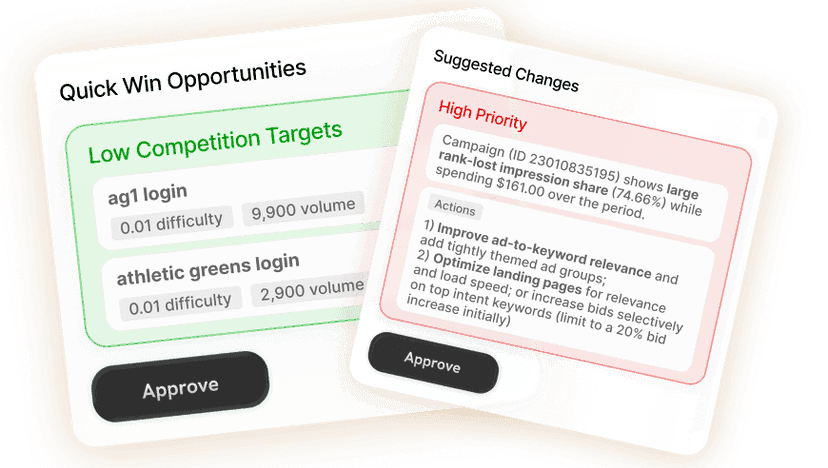
Sprites analyzes the account from top to bottom and ranks every issue by the spend involved: search terms that never convert, keywords bidding against each other, budgets capped on your best campaigns, ad assets Google rates as low.

Approve or create
3

Approve the fixes

Every change is staged in your account with the reasoning next to it. Approve all of them, some of them, or edit first. Sprites then re-reads the account after the changes settle and reports the effect.

What gets analyzed at each level

The checks Sprites runs and the fixes that follow.

LevelWhat Sprites checksWhat you get
Account and campaignsStructure, campaign types, bidding strategies, location and network settings, conversion tracking health, budget pacing, and Performance Max overlapping with Search or brand terms.Structural problems ranked by the spend they affect.
Search termsEvery query that triggered an ad in the period, matched against conversions and cost, to find irrelevant themes, spend with no conversions, and converting queries not yet added as keywords.Negative keyword lists and new keyword additions, ready to apply.
Keywords and ad groupsMatch types, quality signals, cannibalization between keywords and campaigns, ad groups with too many themes, and keywords starved by budget or bids.Pause, restructure and bid changes with expected impact.
Ads and assetsResponsive search ad strength, asset performance labels, missing headline coverage for top keywords, and image and video assets that Google rates as low.Replacement headlines, descriptions and assets, staged for approval.

Wasted spend, found in the search terms

The biggest leaks in most Google Ads accounts are not visible at the campaign level. They live in the search terms report: broad match keywords pulling in queries for jobs, free tools and unrelated products, spend that has run for months without a single conversion, and location settings that pay for clicks from countries you do not serve. Sprites reads the full search term report for the period, groups the waste by theme, totals what it cost, and proposes the negatives that stop it.

It runs the same check in reverse. Queries that convert well but only match a keyword loosely get proposed as exact-match additions, so the account buys more of what already works.


Structure and bidding problems that quietly cap results

Some findings are about how the account is set up rather than what it is buying. Sprites flags campaigns that share a budget with a much weaker one, smart bidding running without enough conversions to learn, Performance Max taking brand traffic Search would have won cheaper, search partners switched on by default, and conversion actions counted twice. Each is explained in plain language with the numbers, so a marketer who has never opened the bidding settings can decide with confidence.

Ads and assets rated by Google, rewritten by Sprites

Responsive search ads and Performance Max asset groups carry their own performance signals: ad strength, asset performance labels, and which headlines Google actually serves. Sprites reads them at the asset level, tells you which headlines and images are dragging a campaign down, and drafts replacements that cover the keywords the current ad ignores. The new assets are staged in the ad, not pasted into a document.

  • Responsive search ads: headline and description coverage for the top keywords in the ad group
  • Performance Max and Demand Gen: image, video and text assets with low or best labels
  • Ad-level metrics so a strong ad in a weak ad group is not paused by mistake

Fixes you approve, an audit that repeats itself

Every recommendation is a staged change in your Google Ads account: the negative list, the budget move, the paused keyword, the new asset. You approve them in one place and Sprites applies them through the API. After the changes settle it re-reads the account and reports what moved. Scheduled as a weekly Autopilot, it repeats the whole analysis, applies the categories of fix you have pre-approved, and only interrupts you for the decisions that need a human. Agencies run it across every client workspace with white-label reporting.

Prompts you can run today

Each one opens in Sprites with the prompt pre-filled. Connect Google Ads and the analysis starts immediately.

  • Full account analysis“Analyze my Google Ads account”Run this in Sprites
  • Wasted spend in search terms“Show me search terms from the last 30 days that spent money without converting, group them by theme, and stage them as negative keywords.”Run this in Sprites
  • Weak ad assets“Which of my responsive search ad and Performance Max assets are rated low, and draft replacements for each one.”Run this in Sprites

Our Users Love Sprites

Growth Architects
Growth Architects

“Sprites made us an AI-native agency. The quality and level of work we deliver now is on a completely different tier. It's not a tool we use, it's how we operate.”

Brooks Golden

Brooks Golden

Founder · Growth Architects

Rehive
Rehive

“We took our ABM playbook back from two agencies and cut cost-per-lead by two-thirds in six weeks. Sprites turned our marketing into an in-house ads and content factory.”

Helghardt Avenant

Helghardt Avenant

Founder & CEO · Rehive

Coplay
Coplay

“I've already recommended it to 4–5 other founders. It freed up time for strategic work while getting us users from ChatGPT and Google Ads on autopilot.”

Jos van der Westhuizen

Jos van der Westhuizen

CEO · Coplay

Discover case studies →

Frequently asked questions

What does the Google Ads analyzer check?

+

Everything the API exposes: campaign structure and settings, bidding strategies, budgets and pacing, keywords and match types, the full search term report, ad strength and asset performance labels, conversion tracking, and location and network settings. Findings are ranked by the spend they affect, not listed alphabetically.

Does Sprites change my account without asking?

+

No. Every fix is staged in your account for approval with the reasoning next to it. Once you have approved a type of change, such as adding negatives from a wasted-spend audit, a weekly Autopilot can apply that type automatically and surface only the exceptions.

How is this different from the recommendations tab in Google Ads?

+

Google's recommendations optimize for Google's goals, mostly more spend and broader targeting. Sprites analyzes your account against your goals, such as a target CPA or ROAS, and is willing to recommend spending less. It also explains each finding with the underlying numbers and applies the fix, rather than offering a one-click button you cannot inspect.

Can it replace my PPC agency?

+

For most in-house teams, yes; that is what customers use it for. The audit, the negatives, the budget moves, the asset rewrites and the weekly reporting are the work a retainer pays for, and Sprites does them the same day with your approval. Your team keeps the goals and the final say.

Can I analyze my Google Ads account from Claude or ChatGPT?

+

Yes. Sprites ships an official MCP server, so you can ask Claude, ChatGPT, Grok or any MCP-compatible assistant to audit the account, show the wasted spend and stage the fixes, using the same Google Ads connection and approval gates as the Sprites app.

How often should I run the analysis?

+

Weekly for most accounts. Search terms accumulate waste every day, and budgets and bids drift as Google changes what it serves. A weekly Autopilot catches problems while they are cheap. Run a one-off deep analysis when you take over an account, change conversion tracking, or launch a new campaign type.

Go deeper

  • PillarGoogle Ads AI agentAudits, campaign builds, keyword research and weekly optimization, approved by you.Read
  • TemplateAd account health checkerA one-run audit of structure, tracking, settings and spend.Read
  • TemplateGoogle Ads campaign optimizerNegatives, bids, budgets and assets for one campaign, staged to approve.Read
  • GuideGoogle Ads optimization checklistThe checks a weekly audit should run, and which ones to automate.Read
  • GuideGoogle Ads from Claude via MCPHow to audit and manage an account from Claude with Sprites.Read
  • Use caseGoogle Ads optimizationThe ongoing loop after the audit: test, move budget, report.Read

Replace the PPC retainer with an audit that fixes itself

Sprites audits and optimizes Google Ads every week, alongside Meta, Microsoft Ads, LinkedIn, TikTok and Reddit. Start with a demo, or talk to us about running it across every client.

Start 7-day trial
Get a demo

Get the free AI-First Marketing Playbook

Packed with proven tactics, creative inspo, and automation tips to help you grow faster with less guesswork.

By clicking send you agree to the Terms and Conditions

Pillars

AI Marketing AgentVibe MarketingAI VisibilityAI Marketing AutomationAI for Meta AdsAI for Google AdsAI for LinkedIn AdsAI SEOAds LibraryChatGPT AdsAI AdsMCP Server

For Teams

For AgenciesFor EcommerceFor FintechFor HealthtechFor EnterpriseFor FreelancersFor Marketing Teams

Prompts Gallery

Marketing Campaign BuilderGoogle Ads Search Campaign BuilderCompetitor Meta Ads AnalyzerSEO Audit + Plan GeneratorGoogle Ads Campaign OptimizerGoogle Ads: PMax Campaign Builder

About

CustomersReviewsBlogTerms of ServicePrivacy PolicyDPACareersSitemap
Sprites TextWizard