Top left star
Hero left decoration
Platform

LinkedIn Ads for B2B,
Run by an Agent

Sprites researches your ICP, builds and reviews LinkedIn campaigns through the official API, and writes the message ads. It drafts your LinkedIn posts too; it does not post or send connection requests for you.
LinkedIn

Top right star
Bottom right star
Hero right decoration

Trusted by 200+ marketing teams

  • Rehive
  • Iris
  • Coplay
  • Startup Science
  • Remio
  • Wellfish
  • Lovon
  • DevScope

What Sprites does on LinkedIn

LinkedIn is the most expensive click in B2B and the one where targeting mistakes cost the most: a campaign aimed at "Marketing" instead of "Marketing Managers at 200 to 1,000 employee software companies" burns a month of budget on the wrong people. Sprites is an AI ads agent that does the LinkedIn work with that precision. It researches the ICP, builds the campaign with the right audience attributes, writes the sponsored content and message ads, and reviews performance by audience and creative.

It works through the official LinkedIn Marketing API and stages every campaign and change for your approval. On the organic side Sprites is a writer, not a poster: it drafts posts in your voice and connection request copy for outreach, and you publish them. The LinkedIn Ads pillar covers strategy and ABM outcomes; this page covers the workflows.

How it works

Connect your accounts
1

Connect Campaign Manager and describe the ICP

Authorize Sprites with your LinkedIn ad account and tell it who you sell to: titles, seniority, company size, industries, named accounts. Sprites researches the segment and turns it into targeting attributes LinkedIn understands.

Get insights and suggestions
2

Review the campaign and the copy

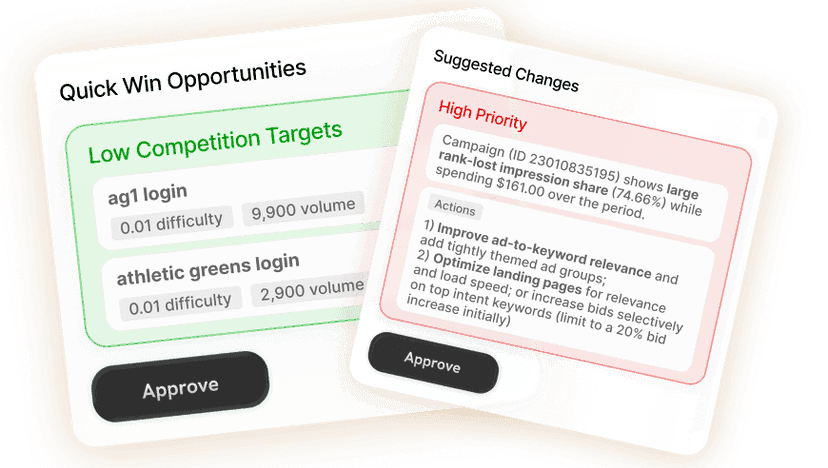
Sprites stages the campaign: objective, audience, budget, bid, placements, and the sponsored content or message ad copy written for the funnel stage. Edit any line before approving.

Approve or create
3

Approve, then review on a schedule

The campaign publishes to Campaign Manager. Sprites reviews cost per lead, engagement and frequency by audience and creative, proposes the pause and scale moves, and reports weekly.

From ICP to reported campaign

Each stage of a LinkedIn Ads campaign and what Sprites hands back.

StageWhat Sprites doesWhat you get
ICP researchReads your positioning, customer list or a description of the buyer, researches the segment on the web, and maps it to job titles, functions, seniorities, company sizes and industries, plus a named-account list for ABM.A targeting brief with the attributes to use and the ones to exclude.
Campaign buildCreates the campaign group and campaigns for lead generation, website visits or engagement, with the audience attached, budget and bid set, and Lead Gen Forms where the objective calls for them.A staged campaign to approve before it reaches Campaign Manager.
CopyWrites sponsored content and message ad copy per funnel stage: a problem-led opener for cold accounts, proof and a specific offer for accounts already engaging, a direct ask for warm ones.Ad and message variants labeled by stage and angle, ready to test.
Performance reviewCompares cost per lead, click-through, engagement and frequency by audience segment, creative and format; flags saturation and wasted reach; proposes budget moves.A weekly review with staged pause, scale and refresh changes.

ICP research that turns into targeting

Most LinkedIn budgets are wasted before the first click, at the audience step. Sprites starts there. Give it your best customers, a product description or a named-account list and it researches the buying committee, the titles that actually own the budget and the ones that only influence it, and the company profile where you close. That research becomes LinkedIn targeting attributes, exclusions and, for ABM, matched-audience company lists, so the campaign reaches the people you would have chosen by hand with a week to spare.

  • Title, function, seniority, company size and industry targeting from a plain-language ICP
  • Named-account lists for ABM campaigns
  • Exclusions for existing customers, competitors and irrelevant seniorities

Campaign creation through the LinkedIn API

Sprites builds lead generation, website visit and engagement campaigns with the structure a B2B specialist would use: one campaign per segment and stage so the results stay readable, Lead Gen Forms with the fields your sales team needs and nothing more, budgets that respect LinkedIn's minimums without overspending on a test, and bids set for the objective. Everything is staged for approval, and a working campaign can be duplicated into a new segment or region in one step.

Message ads and sponsored content written for the stage

A message ad to a cold VP of Engineering and one to a director who downloaded your guide last week should not read the same. Sprites writes each for its funnel stage and ICP: the opener, the one-line reason to care, the proof point, the ask, and the subject line, in the register your brand uses. It produces several variants per audience so the test is set up when the campaign launches, and it rewrites the ones that underperform in the weekly review.

Performance review by audience, creative and format

LinkedIn reporting shows totals; the decisions live in the splits. Sprites reads cost per lead, click-through, lead quality signals and frequency by audience segment, ad and format, tells you which segment is producing the pipeline and which is producing the spend, and stages the budget moves that follow. Set it as a weekly Autopilot and the review lands in your inbox with the changes already prepared.

Posts and connection requests: drafted, not sent

Sprites writes LinkedIn posts in your brand tone, hooks for founder-led content, and connection request and follow-up copy for outbound. It does not publish posts to LinkedIn or send connection requests on your behalf; automating those is against LinkedIn's terms and gets accounts restricted. What Sprites runs end to end is the paid side, and it can turn a post that performed organically into a sponsored content campaign aimed at your ICP.

Prompts you can run today

Each one opens in Sprites with the prompt pre-filled. Connect your LinkedIn ad account and the agent takes it from there.

Our Users Love Sprites

Growth Architects

“Sprites made us an AI-native agency. The quality and level of work we deliver now is on a completely different tier. It's not a tool we use, it's how we operate.”

Brooks Golden

Brooks Golden

Founder · Growth Architects

Rehive

“We took our ABM playbook back from two agencies and cut cost-per-lead by two-thirds in six weeks. Sprites turned our marketing into an in-house ads and content factory.”

Helghardt Avenant

Helghardt Avenant

Founder & CEO · Rehive

Coplay

“I've already recommended it to 4–5 other founders. It freed up time for strategic work while getting us users from ChatGPT and Google Ads on autopilot.”

Jos van der Westhuizen

Jos van der Westhuizen

CEO · Coplay

Discover case studies →

Frequently asked questions

Does Sprites post to LinkedIn or send connection requests?

+

No. Sprites drafts posts, hooks and connection request copy, and you publish or send them. It does not automate organic activity on LinkedIn, which LinkedIn's terms prohibit. What it runs end to end through the official API is LinkedIn Ads: campaigns, audiences, copy and optimization.

Which LinkedIn campaign types can Sprites create?

+

Lead generation with Lead Gen Forms, website visit and engagement campaigns, using sponsored content and message ads. It builds the audience from your ICP, sets budget and bids, and duplicates proven campaigns into new segments.

How does Sprites handle ABM on LinkedIn?

+

You give it the account list, or a description of the accounts you want, and Sprites builds a matched-audience campaign per segment, writes stage-specific copy for each, and reviews results by account tier so you can see which segment produces pipeline.

Can I manage LinkedIn Ads from Claude or ChatGPT?

+

Yes. Through the Sprites MCP server you can ask Claude, ChatGPT, Grok or any MCP-compatible assistant to build a LinkedIn campaign, draft message ads or review performance. It uses the same LinkedIn connection and approval gates as the Sprites app.

Do I still need a B2B agency for LinkedIn?

+

Most teams using Sprites do not. ICP research, campaign builds, copy, weekly reviews and reporting are what the agency did, and Sprites does them in your account with your approval. One marketer can run LinkedIn alongside Google and Meta from the same workspace.

Will it launch anything without my approval?

+

No. Campaigns, budget changes and pauses are staged for approval before they reach Campaign Manager. You can pre-approve specific change types, such as pausing a creative above a frequency threshold, for a weekly Autopilot.

Run LinkedIn Ads in-house, with the precision of a specialist

Sprites researches the ICP, builds the campaigns, writes the message ads and reviews the results, and waits for your approval at every step. Start with a demo on your own account.