

Every ad your competitors run on Facebook and Instagram is public. Meta publishes all of them in the Ad Library, free, no login, and in 2026 each one carries an impression range and, for EU-delivered ads, reach and targeting. The hard part is not access. It is getting from a wall of creatives to an answer: what they are pushing, what is working, and what you should do about it.
This guide covers how to see competitors’ Facebook ads four ways, from the Meta Ads Library step by step to a free analysed library, then a competitor ads analysis you can finish in twenty minutes.
The quick answer
- Go to facebook.com/ads/library.
- Set the country, choose All ads, and search the competitor’s Page name.
- Sort by impressions, filter by media type, and open See ad details on the oldest ads.
- Switch the country to an EU state to read reach and targeting.
- Or skip the scrolling: open the Sprites Ads Library for the same ads with hooks, CTAs, landing pages and run length already analysed.
Method 1: The Meta Ads Library, step by step
Step 1: Open the library and set the scope
Go to facebook.com/ads/library. Two controls at the top decide what you see. Country limits results to ads delivered there; pick your market, or “All” for a global view. Ad category must be set to All ads, since the default on some regions is political and issue ads only.
Step 2: Search by advertiser
Type the competitor’s Page name. A dropdown offers matching Pages with their profile picture and follower count; pick the right one, because large brands often have regional Pages and imitators. The result is every active ad from that Page across Facebook, Instagram, Messenger, Threads, WhatsApp and Audience Network.
Step 3: Search by keyword instead
To find every advertiser using a claim, offer or product term, search a phrase rather than a name. Two operators change everything:
- Quotes for an exact phrase:
"free shipping on your first order". - A vertical bar to match any of several words:
retinol | peptide | collagen.
Keyword search is how you find competitors you did not know about, and the copy patterns an entire category shares.
Step 4: Filter and sort
The filter row is where the library earns its keep. Language, platform (Facebook, Instagram, Messenger, Audience Network, Threads, WhatsApp), media type (image, video, meme, none), active status and impressions by date. Sort by the impression bucket to skip the ads nobody saw; the “Low impression count” badge marks ads under 100 impressions, usually tests that failed.
Step 5: Read an ad properly
Click See ad details. This is where the useful data lives: the start date, every creative variation of the concept, the platforms it runs on, the landing page URL, and the impression range. Note the start date on every ad you care about. An ad started four months ago and still live is being paid for on purpose.
Step 6: Unlock EU reach and targeting
Change the country to any EU member state and open an ad the competitor delivers there. The European Union transparency section shows reach broken down by age, gender and country, the targeting the advertiser selected (locations, age range, gender), and who paid for and benefits from the ad. This is the only place Meta publishes targeting for commercial ads, and most marketers never look.
What the library will not show you
Spend (except for political ads), clicks, conversions, and ads that have already stopped, which vanish outside the EU. Nor can it compare two advertisers. Those gaps are why the next three methods exist.
Method 2: From a competitor’s Page
On any Facebook Page, open About and then Page transparency. It shows when the Page was created, where its managers are based and whether it is running ads, with a direct link to that Page’s Ad Library results. Useful when you have the Page open already, or when the Ad Library search returns several similarly named Pages and you need the right ID.
Method 3: A free ad library with the analysis done
The Sprites Ads Library reads the public Meta, Google and LinkedIn libraries for dozens of fast-growing tech and SaaS companies every week and publishes one analysed page per advertiser. Instead of a wall of creatives you get:
- Live ad count and format mix (video, image, carousel).
- Hooks and CTAs, ranked by how often the advertiser uses them.
- Landing-page destinations, so you can see their funnel from the ad side.
- Longest-running creatives and ads launched per week.
- An estimated monthly spend range, calculated using Sprites’ proprietary AI model from the public data and labelled as an estimate.
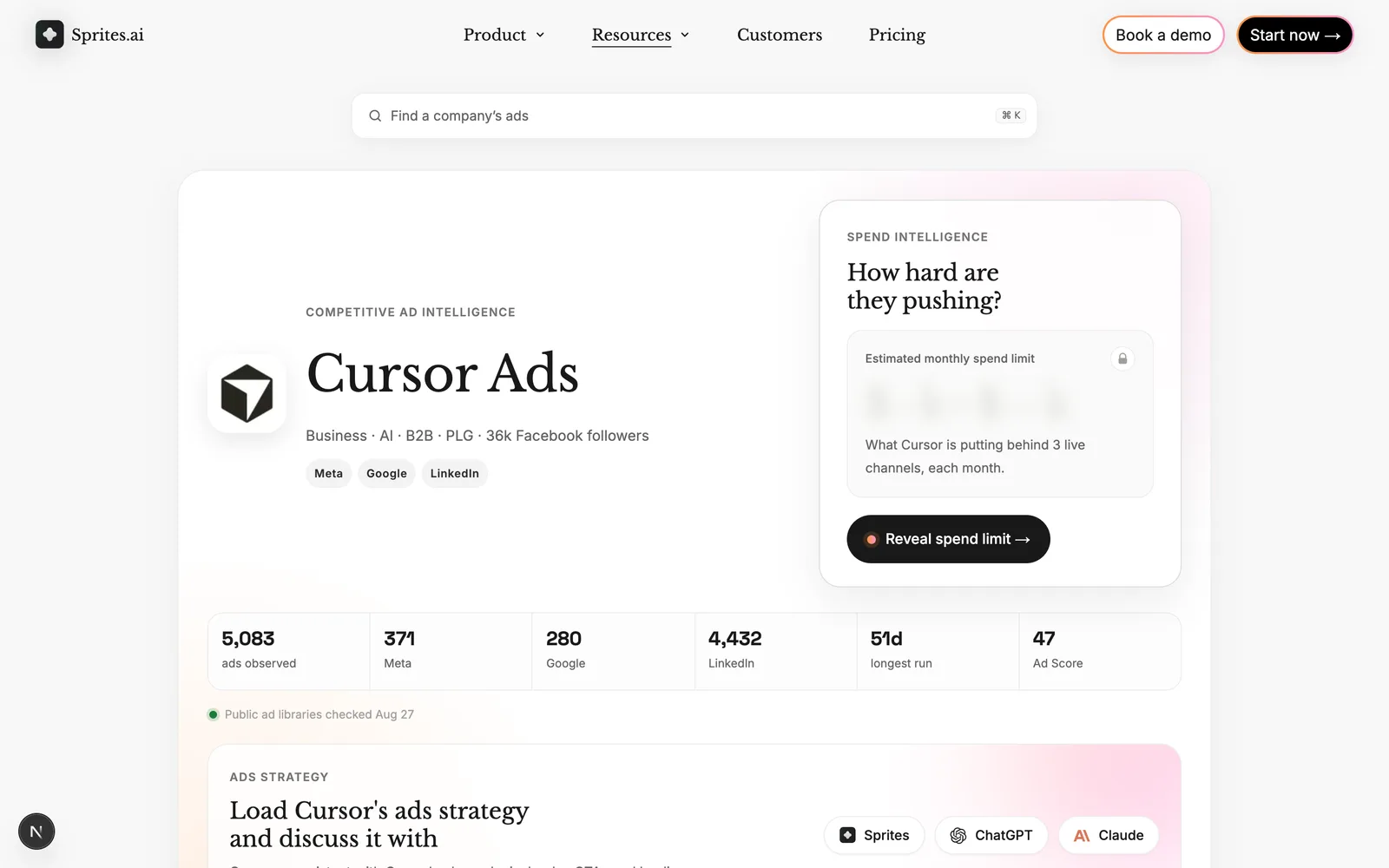
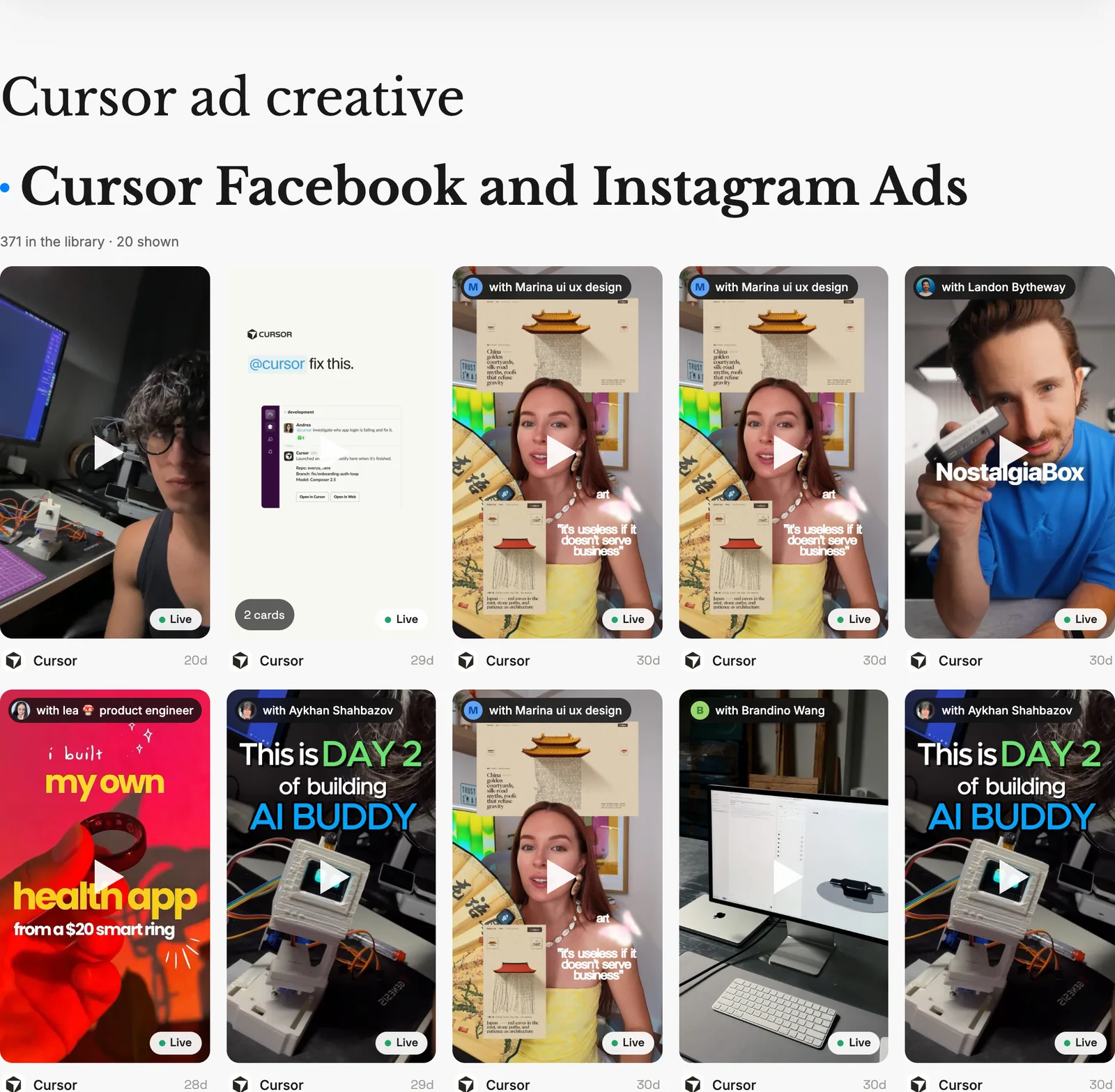
Browsing is free with no account; full advertiser pages open with an email. For a competitor outside the index, the Sprites copilot pulls a brand’s live Meta ads by Page or keyword on request and writes the analysis. Curated galleries of Facebook ad examples and B2B ad examples are the fastest way in.
Method 4: Ad spy tools when you need history or scale
If you need ads that have already stopped, keyword search across hundreds of millions of ads, or engagement filters, a paid spy tool is the answer. BigSpy starts at $9 a month with a free plan, AdSpy is $149 flat with the deepest Meta archive, Minea ($49 and up) is built for ecommerce product research. The full tool stack is ranked, with prices and screenshots, in our best Facebook ad spy tools of 2026, and the wider set of options in Facebook Ad Library alternatives.
Seeing competitors’ Instagram ads
Instagram ads live in the same Meta Ads Library; filter platform to Instagram to isolate them. Two Instagram-only routes exist as well. On a brand’s Instagram profile, the menu offers About this account and then Active ads. And any sponsored post in your own feed has Why you’re seeing this ad, which reveals the targeting attribute that caught you, a small window into their audience choices.
A competitor ads analysis in twenty minutes
Seeing the ads is the easy half. Here is the analysis that turns them into decisions, with the proxy each column relies on. Fill it for three to five competitors and the patterns are obvious.
| What to record | Where to find it | What it tells you |
|---|---|---|
| Active ad count | Ad Library results, or the Sprites advertiser page | Investment level and testing velocity |
| Oldest live ads (start date) | See ad details | Their proven winners |
| Variations per concept | See ad details | What they are iterating on, which is what works |
| Offer | Ad copy and landing page | Discount, trial, bundle, guarantee, none |
| Hook (first line or first three seconds) | Creative | The angle they lead with: pain, proof, price, curiosity |
| Format mix | Media type filter | Where they put production budget |
| CTA | Creative | Funnel stage: Learn more vs Shop now vs Book a demo |
| Landing pages | See ad details | One page means message testing; several means segmentation |
| Impression bucket | Ad card | Scale of each concept |
| EU reach and targeting | EU transparency section | Demographics and the geography they pay for |
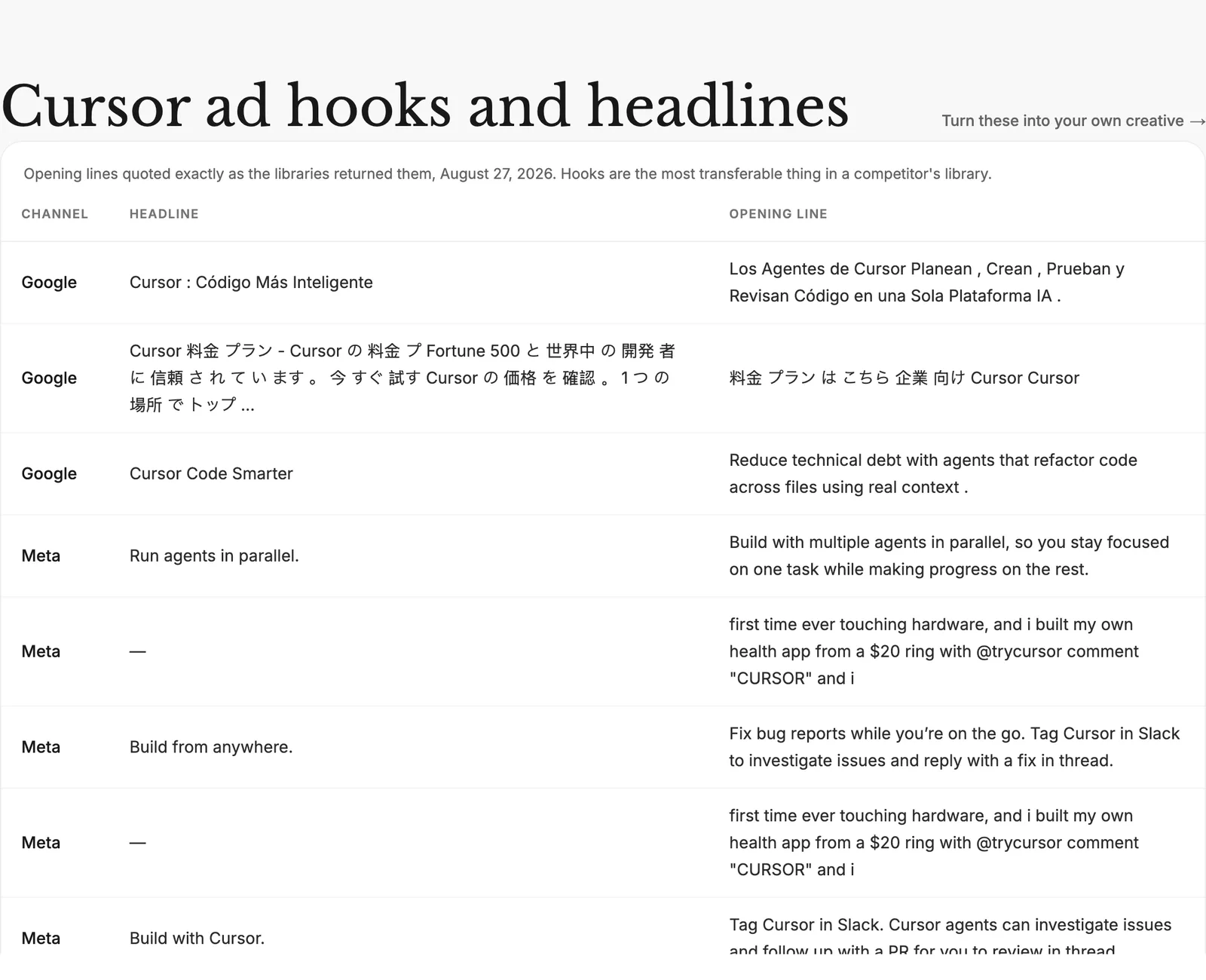
Three reads to make from the completed sheet:
- Where they are confident. Long-running concepts with many variations. Do not fight these head-on; find the angle they are not running.
- Where they are testing. Clusters of new ads with low impression buckets. This is next quarter’s strategy showing early.
- Where the category is identical. If every competitor leads with the same offer, a different offer is the cheapest differentiation available.
Keep it running without the weekly chore
A competitor check is worth doing weekly and nobody does it weekly by hand. Sprites runs competitor analysis as a scheduled task: the copilot pulls each competitor’s live ads, compares them to last week, and reports only what changed, such as new launches, dropped offers or new landing pages. The same copilot can then draft your response and launch it on Meta, with your approval on every change.
Seeing the ads is the first half. The second is creative analytics: reading the hook, angle and format behind each one so the findings turn into your own tests. The workflow is in how to analyze competitor ads and turn winning patterns into hooks.
Frequently asked questions
How can I see my competitors’ ads on Facebook?
Open facebook.com/ads/library, set the country and choose All ads, then search the competitor’s Page name. Every active Facebook and Instagram ad appears with its creative, copy, start date, placements and an impression range. Click See ad details for the landing page and every variation. For analysed results without the scrolling, open the Sprites Ads Library, which is free.
How do I find competitors’ ads by keyword?
In the Meta Ads Library, choose All ads and type a phrase instead of a Page name. Wrap the phrase in quotes for an exact match, or separate words with a vertical bar to match any of them. Then filter by country, language, platform and media type, and sort by impressions. This finds every advertiser using a claim or offer, not just the ones you already know.
Can I see how much a competitor spends on Facebook ads?
Not exactly. Meta publishes spend only for political and issue ads. For commercial ads you get an impression-range bucket on every ad and, for ads shown in the EU, reach broken down by age, gender and country. The Sprites Ads Library publishes an estimated spend range calculated from that public data, labelled as an estimate.
Can I see a competitor’s Facebook ad targeting?
Only for ads delivered in the EU. Set the country to any EU member state, open an ad, and the European Union transparency section shows the locations, age range and gender the advertiser selected, plus who paid for and benefits from the ad. Outside the EU, targeting is never published.
How do I know which competitor ads are working?
Use proxies, because performance data is never published. Ads that have run for months are being paid for on purpose. Concepts with many variations are being iterated because they win. High impression buckets and EU reach show scale. Landing pages that many ads share are the pages the competitor trusts. The Sprites Ads Library ranks creatives on longevity and continued activity for this reason.
Is it legal to look at competitors’ Facebook ads?
Yes. Meta publishes every active ad in the Ad Library precisely so anyone can look. Analysing competitor ads is ordinary market research. Copying their creative, copy or trademarks is a different matter, so use what you learn to build your own angles.
How often should I check competitors’ ads?
Weekly for a direct competitor, monthly for the wider category. New ad launches, offer changes and seasonal pushes are the signals worth tracking, and each takes five minutes to spot on an advertiser page. A scheduled competitor analysis in Sprites can do the check for you and report only what changed.
Next steps
Pick your three closest competitors and run the analysis above once, in the Meta Ads Library or on their Sprites Ads Library pages. Then read the Google Ads Transparency Center guide to do the same for their search and YouTube ads, since the brand that wins on Facebook usually shows its hand on Google first.